Pages

Showing posts with label Modern Technology. Show all posts

Pictures- Tecno Phantom 6 And 6 Plus With Full Specifications

I don't think there's anything to say but the pictures below says it all. I know most of you having been waiting for the launch of the Tecno Phantom 6 plus launching, but the pictures below says a lot about the incoming Phantom 6 and 6 Plus. Even if earlier specifications about these smartphones were mere guessing,Well, pictures cannot deceive anyone even if words can.

At least those of you that said you don’t agree with the Tecno Phantom 6+ battery capacity, Checkout the pictures above and judge for yourself. You can zoom the picture to see the full specifications.
What do you think?

LeEco Le Pro 3 Launched With 6GB Ram, Incredible Specifications

LeEco as promised has come up with an incredible monster smartphone launched yesterday, LeEco Le Pro 3.

The LeEco Le Pro 3 runs EUI 5.8, based on Android 6.0 Marshmallow. The dual-SIM (Nano-SIM) smartphone sports a 5.5-inch full-HD (1080x1920 pixels) display with 2.5D curved glass, In-Cell touch tech, and a pixel density of 403ppi. It is powered by a 2.35GHz quad-core Qualcomm Snapdragon 821 SoC that's coupled with the Adreno 530 GPU.

The Le Pro 3 sports a 16-megapixel rear camera with an f/2.0 aperture, PDAF, HDR, BSI CMOS sensor, 4K video recording at 30fps, and a slow-motion recording of 720p at 120fps. On the front, the smartphone bears an 8-megapixel camera with an f/2.2 aperture, and a 76.5-degree wide-angle lens.
Comes in different variant, 4GB RAM + 32GB ROM 4GB RAM + 64GB ROM 6GB RAM + 64GB ROM 6GB RAM + 128GB ROM.

The Le Pro 3 is powered by a 4070mAh, which although still a far cry from 5000 mAh, is impressive nontheless, especially in a 7.5mm thick body. 
The phone also supports 24W QuickCharge 2.0, which LeEco is confident, can get you from zero to 50% in 30 minutes (impressive for a 4 thousand amp battery).
Highlights of LeEco Le Pro 3 Spec
Name: LeEco Le Pro 3
Display: 5.5-inch, 1080 x 1920 pixels (403 PPI), IPS LCD Capacitive touchscreen
Finger Printer ID recognition
OS: Android 6.0 Marshmallow
Camera: 16 MP, phase detection autofocus,Gender recognition dual-LED flash
+ 8MP front camera
Connectivity: USB type 1.0, 2G/3G/4G supports
Battery: 4070mAh
Launching Price: $270,$300,$375 & $450

Latest- Checkout Price of Iphone 7 Here in Nigeria Online Stores

Those of you who have been anticipating to get the newly launched iPhone 7, which is now available in Nigeria at a giveaway price. I just checked on Konga now and the 128GB variant goes for N540,000.

I checked another, and the 32GB variant goes for N430,000. 
It is water resistant, dust resistant and the fastest phone in the world according to geekbench result.

LATEST- Opera Launches Desktop Version of its Unlimited Free VPN

After bringing its free VPN services to iOS and Android, Opera has now released a free, no-login VPN for desktop users as well. The VPN is bundled in to the latest Opera 40 browser and requires no sign-in or any setup - using it is as simple as the press of a single button. 
 
You may recall that Opera put a VPN inside its browser earlier this year in April before then rolling it out on its iOS and Android but that was the developer version only. With today’s update Opera 40 the Norwegian company is bringing the privacy and security benefits of a VPN to all of the users of its desktop browser.
Notable features of Opera 40 VPN For Desktops
>>It is Free and Unlimited
>>Opera 40 support for Google’s Chromecast streaming dongle
>>Allows you to change your geographic location while also protecting your data from third party snooping
>>Automatic battery saving for unplugged laptops.
Opera VPN lets you choose from one of five locations - Canada, Germany, The Netherlands, Singapore, and USA.
How to Activate For Mac, Linus & PC
To activate it, Mac users just need to click the Opera menu, select "Preferences" and toggle the feature VPN on, while Windows and Linux users need to go to the "Privacy and Security" section in "Settings" and enable VPN there.
Download Opera 40 Latest Browser here
"If people knew how the internet truly works, I believe they all would use a VPN," quotes Krystian.

Here's How to Locate a Stolen or Missing Phone With Android Device Manager

It is important for every android users to activate this options on their device should in case the unexpected happen. Losing your smartphone can be painful but you have lots of options on how to recover it. 


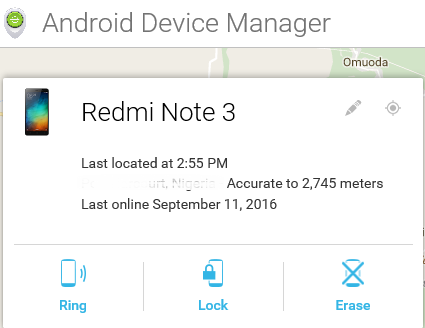
Android Device Manager is a Google’s official and easy-to-use tool to track your Android phone or tablet. The best thing about it is that you don’t need to install an app to be able to track your devices. The only requirement is that your device must be connected to your Google account; location access must be turned on and connected to the internet.
With ADM, you can do these-
>>Make the smartphone to ring for Maximum 5 minutes non-stop
>>Lock the phone completely 
>>Wipe all the data and information's stored on the phone
Requirements
>>Turn on location access on your device
>>Make sure you are connected to a google account
>>Have an internet access on the device.
Login with your google account and track the location of your phone. Simple and easy.

Here's All You Need to Know About the Verve Paycode - A Cardless ATM Withdrawals and Making POS Payments

Life is getting more and more easier by the day as a result of latest modern technology which we need to stay up-to-date with. I'm happy to inform you that there is a new way in Nigeria to withdraw your money from the ATM machine without your debit card being nowhere around you. It really looked liked a big joke until I personally went to the atm to try it.
We all know how it feels when you in urgent need of cash, but your ATM card is lying at home and you not anyway close to it and there’s money in your account, but you can’t access it due to the absense of your ATM card.

Nigeria’s largest payment processing company - Interswitch, has launched "Verve World", an application which enables cardholders to store all their payment options and to carry out everyday transactions without  using their cards physically. You can now withdraw the cash in your account without using an ATM card, all you need is a Verve Paycode.

Verve Paycode is a secure code that can be generated from cards stored in your eWallet (Verve eCash). Verve eWallet can securely store any card from any Bank.

Verve eCash is a virtual payment card that allows you to transact in every way you would with a physical card. With eCash, you no longer need card number, OTP, CVV2 or expiry date to complete your online transactions. Recharge, Pay bills, Transfer funds and even withdraw cash from an ATM or make POS payments directly from your eCash.

 Download Verve World app from the link below to get started.
MW15_ANDR MW15_BBRY MW15_APPL

Login/Registration Process
 
Open the Verve World installed app, login with an existing Interswitch account if you have an account with Interswitch before and if not, choose Sign Up and fill all the important details, Then you add the details of your ATM card on to the Verve World App and proceed.

After successful registration, you should get this notification and an accompanying email from the Verve International team with “Welcome to Verve eCash” in the subject line.
How to Fund Your Verve eCash
Click the button that says ‘Fund my eCash’. On the next screen, you will be required to enter the amount you want to withdraw.


Even after adding a card to the application, you may have to input your details again in the “Payment Card” option

How to Generate Actual Verve Paycode
After funding the eCash, you will get a notification to that effect. Under every page, there is the eWALLET, 1-TOUCH and PAYCODE options, click on “PAYCODE” to generate.

After selecting PAYCODE, the below page will be displayed.

In selecting a channel, there is the option of ATM, POS or Paypoint Agent. Choose ATM as it is our case study for this post.

In selecting a payment card, choose your already funded Verve eCash or select from the stored Cards.

The cash-out pin is the one you are going to input in the ATM and your card pin is, of course, your personal card pin.
Important Notice
After the last procedure described above, you should be able to use your cashout pin in any ATM unless;
  • You have insufficient balance in your account.
  • You do not have a token– physical or software and so cannot use the card online.
  • There is not sufficient internet connectivity.
AND;
  • Verve Paycode works for any bank card as long as it’s Verve, Visa or Mastercard
  • Multiple cards can be added to the application
  • Cardless ATM Withdrawals DOES NOT work on every bank’s ATM (that is the machine).
  • The Machines I know are: ATMs belonging to Zenith Bank, Stanbic IBTC Bank, Guaranty Trust Bank and Fidelity Bank which are compatible with the Verve World App and Verve Paycode.
If all the above conditions has been done, then you are definitely good to go.
Now using the ATM is the really tricky part and seems to be where most people get stuck. Most ATMs have the options of cardless operation, to be sure, ask the orderlies around.
Or walk up to any one of them and press the “ENTER” key multiple times. It should display the option.
How to Withdraw from the ATM
GTBank ATM has already been used for this transaction, And all you need to do is follow the Instructions below-

If you look closely at the display above, it gives the instructions on performing Cardless Transactions; that is, using the ATM to withdraw without ATM card. Even though the instruction makes it easier, some ATMs do not spell it out, so just press the “ENTER” button on the keypad twice, and if it does not still bring out the option, then the machine is probably not configured for Cardless Transactions.

The next screen after pressing the “ENTER” key will be self-explanatory as the tag of your selection will include Quickteller.  The Verve World App, Verve Paycode and Quickteller are all products of Interswitch, so they are in one family.

After selecting the Quickteller option, this screen comes up and prompts you to enter the already generated code, then the ATM proceeds to produce the exact amount of cash that was entered when generating the Verve Paycode on the Verve World. Simple as that.

At a Stanbic IBTC ATM, press zero “0” on the keypad to be taken to a page that has “Quickteller Cashout” written on it and the machine will give a prompt for the already generated Verve Paycode. 

Zenith Bank ATMs have the same procedure, but you have to press the enter key to access “Quickteller Cashout” option, and input your Verve Paycode

Note: It includes a N100 surcharge at cashout.

Also Note:
To make every thing simply. You can generate a Paycode by simply dialing *322*8*Amount#. You don't need to have a smartphone or internet access

Have Any Questions to ask, Kindly use the comment form below. Thanks

Here's How To Root the new Infinix Hot 4 X557 WithTWRP Recovery Mode

Infinix Hot 4 X557 is a sleek and unique smartphone,a newly released Android device by Infinix mobility that runs on Android 6.0 Marshmallow Chameleon XOS. The Infinix X557 comes with some  premium features such as the Fingerprint Senor and the superb Battery Life, powered by 1.3GHz quad-core Cortex-A7 processor type, Mediatek MT6580 chipset coupled with 2GB RAM, 16GB internal storage plus micros SD Card support, and others.


I know most of  you will love to root your Infinix Hot 4 Smartphone, probably because you want to explore more, what you dont know is that this is the final Andriod  OS, Android M which is  also  stubborn when it comes to rooting and bypassing security, because most rooting  applications such as Kingroot, Kingoroot, Vroot, Framaroot, Rootgenius and others are not workiung in any ways. The tutorial which you will get to know will guide you on the best way to root the Infinix X557 and install TWRP Recovery which will enable it to get rooted.

Before proceeding further, PLEASE NOTE-
After rooting your smartphone, it’s advisable not to forget that you should always unroot the device before performing an OTA update or restoring factoring settings. You can read a guide online on why you should do that

Things Needed For Rooting your device
» USB Cable - for connection with your smartphone and PC.
» SP Flash Tool - Download it Here
» VCOM Drivers - You can check google to download your device type
» TWRP Recovery Image for Infinix Hot 4 - Download it Here
» SuperSU-v2.76.zip - Download it Here

How to Install TWRP Recovery and Rooot Infinix Hot 4 X557
» Save the SuperSU 2.76.zip that you downloaded to your phone's SD card, After which you Unzip the TWRP zip file that you downloaded and flash the recovery image to the phone using SP Flash Tool
How Can I Flash it Using SP Flashtool? Check out this link for the instruction: Link

» Now, boot your phone into TWRP Recovery Mode  which is by Holding the Vol Up and Power button simultaneously for 5 seconds
» In TWRP, if you get a prompt asking you to swipe to allow modification of the System partition, tap Keep Read Only
» If TWRP offers to root the phone, select NO
» In TWRP recovery, tap Install
» Navigate to the location of the SuperSU 2.76.zip and select it
» Swipe to confirm flashing of SuperSU.zip and wait till flashing is done
» After a successful flashing you can go back and reboot.

It should be easy. You may download Root Checker from Play Store to verify if rooting was successful.

Meet the Full Of Lies Turing Mega Smartphone Cadenza With 12GB Ram, 1Terabyte ROM Storage 60MP Rear Camera

I have been seeing different types of awesome smartphones but I have never come across any one so mouth watering as this one. I mean this is full of technology impossible lies and I don’t want to call it Impossible and daring to the tech world.

It is a Massive smartphone that looks promising in to speeding the non-existence of the latest Apple iPhone 7 and Samsung Galaxy Note 7. This is superb right? I know!, and  this is not the first time Turing Robotic Industry is producing this kinda smartphones But Trust me,  This is one is so exclusively different from the others.
CEO of Turing Steve Chao revealed that the outstanding phone is part of the "The Outlander Blueprint" program which aims to integrate artificial intelligence into smartphones.
Turing Phone Cadenza Spec
The Turing Phone Cadenza will features a 5.8-inch, Quad HD display that supports a 2560 x 1440 pixel resolution. It will be equipped by two rumoured Qualcomm Snapdragon 830 chipsets with two 6GB LDDDRX RAMs, making it the first ever smartphone to have a whopping 12 GB of RAM. 

The Mega Smartphone will also have a total of 1TB of storage- two 256 GB built-in storage and two 256 GB storage support for microSD slot.

As for the camera which is also an important part in any smartphone, The Turing Phone Cadenza will house a 60MP "iMAX 6K Quad Rear Camera and Triple Lens/ T1.2" as well as 20MP front-facing camera, which is just the rear camera of most smartphones ever to be made.
The said device is expected to run on Swordfish OS, an unannounced operating system based on Sailfish that will feature AI deep learning.

Turing Phone Cadenza will be powered by a 2400mAh Graphene Supercapacitor Battery along with a 1600mAh Li-Ion Hydrogen Fuel cell.

Users can also install a total of four SIM cards. Are you Kidding me?!. The said device can also support WiGig that can deliver speeds of 60GHz 91Gbps.

Highlights of Turing Phone Cadenze
=>   2 Snapdragon 830 processors
=> 12 GB of RAM
=>    60 megapixel rear camera with Triple lens
·=>   20mp Dual front cameras
=>   1 Terabyte internal storage
=>    2 MicroSD card slots
·=>   Triple power source: a 2400mAh graphene superconductor battery + a 1600mAh lithium ion battery + hydrogen fuel cell.
=>   A graphene oxide composite body, built around a high temperature alloy and Liquid Metal 2.0 structural frame
=>   Swordfish OS,

The Turing Phone Cadenza is slated for release in 2017. Watch the 2min full spec video below
{WATCH}

I'm guessing this is the smartphone anybody would be proud to make use of when it's realeased!

Facebook partners Coollink to launch Express WiFi in Lagos

facebook-front-sign
According to this report, Facebook is partnering Coollink, a Lagos based Internet Service Provider (ISP), to launch Express WiFi in Lagos.
Express WiFi is a Facebook initiative to bring Internet connectivity to underserved locations around the world.
It does this through partnership with local entrepreneurs to help provide quality Internet access to their neighbours and make a steady income.
Working with local Internet service providers or mobile operators, these entrepreneurs are able to use software provided by Facebook to connect their communities.
Express WiFi in Lagos will enable users surf websites on Free basics for free. However, they’ll have to pay for more browsing activity.
For as little as ₦40, they can get up to 100MB daily, or ₦1,600 for a 5GB monthly plan for extra surfing on a 10Mbps connection which is shared across all the users.
Other data plans include ₦110 for 300MB for 24hrs; ₦270 for 750MB for a week, ₦700 for 2GB for 7 days, and ₦1000 for 3GB for a month.
The service is expected to launch in some parts of Lagos, such as Ikota Shopping Complex, some time this week. Users can sign up for a 14 days free trial and enjoy free Internet for that perios – up to 100MB per day.
Express WiFi was first launched in India. It is part of Facebook’s Internet.org initiative, which will bring Internet to millions who find it extremely difficult to get it.

Here's How to Make Your iPhone Flash When You Get a Text

With this simple trick you are about to read, you can make your iPhone to perform in such a clever way without the usual noise or sound when you receive an SMS or incoming calls. .. by making the LED flash go off. 

If you're a gentle man or woman trying to practice good phone etiquette or in a scenario where you want your phone to be set to silent, this is an ideal way to visually see when a message comes through without any noise. 
Change your Settings
=> First, go to your iPhone's "Settings" menu, then scroll down to select the "General" option.
From the "General" menu, go into your "Accessibility" submenu.

Enable LED alerts

Now, scroll down and look for the section entitled "Hearing." The LED flash setting is part of Apple's suite of tools to help the hearing impaired. 


Toggle the "LED Flash for Alerts" to on, so you see a green oblong under the virtual button.
Now, when your phone's screen is locked and you get an SMS, MMS or phone call, your iPhone's flash will go off several times to alert you. 

To turn the functionality off, just toggle the "LED Flash for Alerts" option back to off. 
That's All.

GAMERS-How to Install PES 2017 on Your Android Smartphone

For game lovers, Pro Evolution Soccer PES 2016 is not just a game, but it unites the body, soul and spirit together. It makes you fully utilizes your free time, and that is why it is call the spirit of football. If you still have the 2016 install on your device, then I think you  are far behind schedule. It is time to upgrade to PES 2017.

PES 2017 also known as Winning Eleven 2017 was announced 25 May 2016, and was declared to be discharged 13 and 15 September 2016 on PC, Xbox 360, Xbox One, PlayStation 3 and PlayStation 4. 


Features of PES 2017
>>Enhanced passing
>>Genuine touch ball control 
>>Enhanced objective tending methods and some more.
Where Can I Download it?
Download PES 2017 here  (Password: PESFUXION2016-17)
Download PPSSPP Gold here
How to Install\ And Play PES 2017 ISO Version On Android Device
1. Download PES 2017 ISO Data from the link above
2. Download and Install PPSSPP Gold from the link above
3. After download extract the Pes 2017 from rar file and Move PES2017.iso to SDCard >>; PSP >> GAME
4. Open PPSSPP Gold that you installed and Find Games, then tap PES2017
Now you can start Play the game, and enjoy!
Don’t miss a moment with PES 2017. This is not just a game... It is an evolution into the extra-ordinary realm of football.Trust Me

Can You BElieve Microsoft Edge Browser is 112% Faster Than Every Other Browser Made

Microsoft has been doing something underground, a perfect replacement browser for internet explorer and according to reports, its in every way faster than chrome and safari browser.

The following were the benchmarks used and the results gotten.
  • On WebKit Sunspider, Edge is 112% faster than Chrome
  • On Google Octane, Edge is 11% faster than Chrome
  • On Apple JetStream, Edge is 37% faster than Chrome
This is a serious challenge to other browsers and if the result happen to be true, then you know that the battle battle line has just been drawn and I expect especially apple and chrome to rise to this challenge.

Meet Homtom Ht10 Smartphone With Iris Scanner Recognition, 4GB Ram + 32GB Rom Specifications

Allow me to crave your indulgence with this 5.5 inches 4G Phablet monster device, for your information; this will be the world’s first Smartphone to be equipped with the second generation of the iris recognition technology. The iris of each individual is unique and can hardly ever change.

This monster smartphone comes with 4GB Ram, 32GB Rom. It’s rear camera of 21MP is completely out of this world with 8MP front facing camera. As if that is not enough, it’s running the latest Helio X20 MTK6797 Deca Core processor, Android 6.0 Marshmallow out of the box.
Let me give you break down of the specifications;
Main Features:
Name: HOMTOM HT10
Display: 5.5 inch 1920 x 1080 Screen
CPU: MTK6797 Deca Core ( Helio X20 )
System: Android 6.0
RAM + ROM: 4GB RAM + 32GB ROM
Cameras: Front 8.0MP + Rear 21.0MP AF with flash
Bluetooth: BT4.1
Features: GPS, Hotknot, OTG, OTA, Iris Recognition, Smart gestures, Wake Gesture
SIM Card: Dual SIM dual standby. (Dual Micro SIM cards)
Network:
2G: GSM 850/900/1800/1900MHz
3G: WCDMA 850/900/1900/2100MHz
4G: FDD-LTE 700/800/850/900/1700/1800/1900/2100/2600MHz
Battery: 3200mAh capacity
Price: $199.99 (N)
See more of the spec here
This is not just a monster device, it covers every thing you want in a device.

Etisalat Free Daily Browsing Working With Tweakware V3.5

It's here again, You can now enjoy Etisalat daily free browsing (45mb) with the latest version of tweakware vpn V3.5, no need to worry about any configuration. All you need to do is download the latest version of tweakware vpn and start enjoying it.. 
How To Use Etisalat daily free browsing (45mb) With Tweakware V3.2

=>Set your mobile APN as Etisalat

=> Click any of the links below to download and install the latest Tweakware vpn V3.5 on your device

Link 1

=> Open the tweakware vpn V3.5 and navigate to settings to select (NG ETISALAT) 0.0K bundle

=> Then go back to the tweakware vpn V3.5 home and click connect to enjoy Etisalat daily free browsing (45mb)
Note that the tweakware will always disconnect whenever you reach your daily 45mb and you have to wait for the next day or you use another etisalat sim card.

Blackberry Finally Launches its Ever First Touchscreen-only Android SmartPhone DTEK50 - See Specs Below

Blackberry has launched its first touchscreen-only Android handset, in a bid to diversify its range of devices. Being the world's first most secure Android smartphone.

 It features a 5.2-inch scratch resistant display,Android 6.0 Marshmallow, a convenience key which you can map to your favorite app and much more. BlackBerry has hardened the OS on the DTEK50, added a secure boot process and much more to ensure that it is the most secure smartphone it can be.
The company says the Dtek50 smartphone offers improved security over rival Android devices, and will cost less than its previous handset- Blackberry Priv.

Watch the official demo video of the New Blackberry Device 


It is the firm's second Android handset after switching focus away from its struggling BB10 platform.

Main Specifications
Operating System
Android 6.0 Marshmallow
Display
5.2-inch, 1920x1080
Scratch-resistant
Processor
Qualcomm Snapdragon 617
Quad-core 1.5GHz
Adreno 405 GPU
RAM
3GB
Storage
16GB
Expandable
microSD up to 2TB
Rear Camera
13MP f/2.0, PDAF
dual-tone LED flash
HDR, 1080p/30 video
Front Camera
8MP f/2.2
1.12-micron pixels
Selfie flash
1080p/30 video
Battery
2610 mAh
Charging
Quick Charge 2.0
Micro-USB 2.0
Water resistance
No
Security
DTEK security suite
FIPS 140-2 Full Disk Encryption
Android For Work, Google Play for Work
Connectivity
Wi-Fi 802.11ac, Bluetooth 4.2 LE, NFC
GPS, GLONASS
Network (NA)
LTE Band 1/2/3/4/5/7/12/17/20/29
HSPA 850/900/1700/1900/2100 MHz
GSM 850/900/1800/1900 MHz
Network (ROW)
FD-LTE Band 1/2/3/7/8/20/28A
TD-LTE Band 38/40/41
HSPA 850/900/1900/2100 MHz
GSM 850/900/1800/1900 MHz
Dimensions
147 x 72.5 x 7.4 mm
Weight
135 g

You can pre-order it from shopblackberry.com for $299.

Tech News-Today

Are anyone considering knowing about the latest technologies updates along with favor becoming within touch with it each now and also then? Well the significance of being in touch with most the technology news cannot be overlooked particularly in the modern times. Therefore, should you take place to become among those, a person certainly would like to locate out the latest and also upcoming technology news along with updates as they most can turn out to be extremely beneficial for you.

In order to keep your self updated, you'll need to make sure that you've your hands on a couple of involving the nearly all dependable and trustworthy technology information resources in which could be really useful in providing Gaming Laptops an individual with using timely and also proper information. one of the actual very well-known and typically utilized information sources associated to always be able to technology information comprises of the Internet, tech magazines, as well as TV shows.


You may locate a lot of details by way of these specific details resources however, some of they are a complete lot a lot much better than others and also next are generally the cause why the factors you may opt for various subscriptions a amount of suitable technology magazines; in another hand, it also features several demerits which is actually that an individual simply are particular in order to get up in order to date just once a new month and also which tends to make it the best case scenario, it may be as soon as the month. Using under consideration the actual fastest and also robust means technology is evolving within the existing times, an individual could possibly be losing out on the lot of essential stuff and you'll always be acquiring informed a whole lot later as in contrast to the majority of individuals about you. Overall, each one involving these magazines are generally an incredibly appealing means to get surrounding you however they really must not be most regarding your supply of information.

Another vital choice an individual must be in a new situation to access to have yourself updated can be via several TV programs which feature around the most recent as well as upcoming gadgets along along with a lot more. However, the particular issue using this supply of details are that you is likely to be just up for you to date even although the TV demonstrate continues air which usually actually implies that a person simply may have to produce your timetable in accordance towards the period the particular program will be becoming aired. Instead, you could do a extremely important factor and that is typically to record the programs even if you do not need adequate time to watch since they are now being broadcasted and also you may watch all of them later relating for your convenience in order that you are usually able to catch up using the latest technologies news using the rest regarding the world.

Our Modern Technology


We are currently in the era where all progress soars at a very fast rate society is continually adapting to come up with solutions to solve a majority of world problems. Technology is the substitute of human domination. It is meant to make mankind smarter and stronger. In this world where people cannot live without any handheld device, computer and internet connection, our suffering world is starting to realize that technology has an opposite effect. We forgot about those who are demented in attempting to make ends meet, lack the basic necessities of life, and those who are mostly neglected.

When the nuclear power was discovered, it started to terrify and paralyze its developers. The sensibility of our modern machinery and its dexterity has made a mess in our society and lead to economic sluggishness. Now is the time to use technology to assist those who cannot help themselves. By utilizing these technologies, there will be much progress in the field of science and medicine, economic establishment dependent on the Internet, emergence of information gateways, and new approach to industrial and farming division. Technology will give the knowledge and education to these people so they may become flourishing nations so they finally can provide on their own.

Time will come that common sickness will be controlled and people will live healthier and longer lives. When an exchange of industrial and agricultural technology take place, new jobs will also be concocted to give higher wages to more people at the same time will prevent child labor. Food supply will also increase; health and medical care will no longer be a problem. Crime rates will be greatly reduced as people are now able to meet their needs. A small jumpstart from these third world countries, alleviation in the lifestyle will be easily felt.

Modern technology utilization, like Internet, a person, or a group of people, may become major role players in the expanding electronic economy. The cost of business transaction can be made affordable with the help of easily and accessible technology. Companies and businesses will start emerging, thus more demand on workforce. This stable growth will in turn result in additional health and educational funding, additional infrastructure; the result will be a country that is competitive in the world market. If these developing countries embrace the technological advancement it will bridge the gap that these developed countries have with underdeveloped ones.

If we treat each as equals, share advancements in technology, the global majority will no longer race to win, but race to help those in need through technological transfers, then the global audience will benefit. Technology is not meant to be used only by the strong minority. Technology is not meant for the gifted few, but it is meant for the whole.