Pages

Showing posts with label Latest Tabs. Show all posts

Pictures- Tecno Phantom 6 And 6 Plus With Full Specifications

I don't think there's anything to say but the pictures below says it all. I know most of you having been waiting for the launch of the Tecno Phantom 6 plus launching, but the pictures below says a lot about the incoming Phantom 6 and 6 Plus. Even if earlier specifications about these smartphones were mere guessing,Well, pictures cannot deceive anyone even if words can.

At least those of you that said you don’t agree with the Tecno Phantom 6+ battery capacity, Checkout the pictures above and judge for yourself. You can zoom the picture to see the full specifications.
What do you think?

LeEco Le Pro 3 Launched With 6GB Ram, Incredible Specifications

LeEco as promised has come up with an incredible monster smartphone launched yesterday, LeEco Le Pro 3.

The LeEco Le Pro 3 runs EUI 5.8, based on Android 6.0 Marshmallow. The dual-SIM (Nano-SIM) smartphone sports a 5.5-inch full-HD (1080x1920 pixels) display with 2.5D curved glass, In-Cell touch tech, and a pixel density of 403ppi. It is powered by a 2.35GHz quad-core Qualcomm Snapdragon 821 SoC that's coupled with the Adreno 530 GPU.

The Le Pro 3 sports a 16-megapixel rear camera with an f/2.0 aperture, PDAF, HDR, BSI CMOS sensor, 4K video recording at 30fps, and a slow-motion recording of 720p at 120fps. On the front, the smartphone bears an 8-megapixel camera with an f/2.2 aperture, and a 76.5-degree wide-angle lens.
Comes in different variant, 4GB RAM + 32GB ROM 4GB RAM + 64GB ROM 6GB RAM + 64GB ROM 6GB RAM + 128GB ROM.

The Le Pro 3 is powered by a 4070mAh, which although still a far cry from 5000 mAh, is impressive nontheless, especially in a 7.5mm thick body. 
The phone also supports 24W QuickCharge 2.0, which LeEco is confident, can get you from zero to 50% in 30 minutes (impressive for a 4 thousand amp battery).
Highlights of LeEco Le Pro 3 Spec
Name: LeEco Le Pro 3
Display: 5.5-inch, 1080 x 1920 pixels (403 PPI), IPS LCD Capacitive touchscreen
Finger Printer ID recognition
OS: Android 6.0 Marshmallow
Camera: 16 MP, phase detection autofocus,Gender recognition dual-LED flash
+ 8MP front camera
Connectivity: USB type 1.0, 2G/3G/4G supports
Battery: 4070mAh
Launching Price: $270,$300,$375 & $450

Latest- Checkout Price of Iphone 7 Here in Nigeria Online Stores

Those of you who have been anticipating to get the newly launched iPhone 7, which is now available in Nigeria at a giveaway price. I just checked on Konga now and the 128GB variant goes for N540,000.

I checked another, and the 32GB variant goes for N430,000. 
It is water resistant, dust resistant and the fastest phone in the world according to geekbench result.

LATEST- Opera Launches Desktop Version of its Unlimited Free VPN

After bringing its free VPN services to iOS and Android, Opera has now released a free, no-login VPN for desktop users as well. The VPN is bundled in to the latest Opera 40 browser and requires no sign-in or any setup - using it is as simple as the press of a single button. 
 
You may recall that Opera put a VPN inside its browser earlier this year in April before then rolling it out on its iOS and Android but that was the developer version only. With today’s update Opera 40 the Norwegian company is bringing the privacy and security benefits of a VPN to all of the users of its desktop browser.
Notable features of Opera 40 VPN For Desktops
>>It is Free and Unlimited
>>Opera 40 support for Google’s Chromecast streaming dongle
>>Allows you to change your geographic location while also protecting your data from third party snooping
>>Automatic battery saving for unplugged laptops.
Opera VPN lets you choose from one of five locations - Canada, Germany, The Netherlands, Singapore, and USA.
How to Activate For Mac, Linus & PC
To activate it, Mac users just need to click the Opera menu, select "Preferences" and toggle the feature VPN on, while Windows and Linux users need to go to the "Privacy and Security" section in "Settings" and enable VPN there.
Download Opera 40 Latest Browser here
"If people knew how the internet truly works, I believe they all would use a VPN," quotes Krystian.

New Google Chatting Messenger App ALLO - Whatsapp Lookalike

There is a new messaging app in technology world and I bet it will make Facebook improve more to impress the world. While Facebook has been working to integrate bots with Messenger, Google went ahead and built a messaging app around the most useful bot there is: Google (googl,)search.

Allo, which was announced in May but is now available for download, marries Google search with many of the fun features people have grown accustomed to using in other apps.
By now, you should be rocking its twin brother Duo, google very own dedicated video calling app, easy to use and user friendly even with slow internet connection.
Both Duo and now Allo are tied to your phone number rather than your Google account, Duo is a dedicated video calling app; while Allo is a dedicated Instant Messaging app comparable to the likes of WhatsApp and iMessage
 Google Allo carries a number of like-minded features which includes
>> group chatting,
>>stickers packs
>>and the option to let messages expire.
>>Dedicated Assistant akin to Google Now, which can readily answer your questions and queries with the '@Google' command.
The big thing that's missing is the ability to make video and audio calls, which was intentional.
Where Can I Download it?
For Android users, download it here
For iOS users, download it here

Note, it is still rolling out to countries gradually...
Google Allo is a smart messaging app.

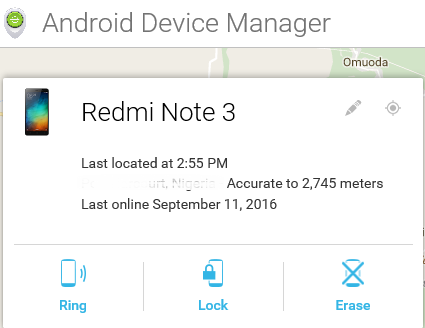
Here's How to Locate a Stolen or Missing Phone With Android Device Manager

It is important for every android users to activate this options on their device should in case the unexpected happen. Losing your smartphone can be painful but you have lots of options on how to recover it. 


Android Device Manager is a Google’s official and easy-to-use tool to track your Android phone or tablet. The best thing about it is that you don’t need to install an app to be able to track your devices. The only requirement is that your device must be connected to your Google account; location access must be turned on and connected to the internet.
With ADM, you can do these-
>>Make the smartphone to ring for Maximum 5 minutes non-stop
>>Lock the phone completely 
>>Wipe all the data and information's stored on the phone
Requirements
>>Turn on location access on your device
>>Make sure you are connected to a google account
>>Have an internet access on the device.
Login with your google account and track the location of your phone. Simple and easy.

Here's All You Need to Know About the Verve Paycode - A Cardless ATM Withdrawals and Making POS Payments

Life is getting more and more easier by the day as a result of latest modern technology which we need to stay up-to-date with. I'm happy to inform you that there is a new way in Nigeria to withdraw your money from the ATM machine without your debit card being nowhere around you. It really looked liked a big joke until I personally went to the atm to try it.
We all know how it feels when you in urgent need of cash, but your ATM card is lying at home and you not anyway close to it and there’s money in your account, but you can’t access it due to the absense of your ATM card.

Nigeria’s largest payment processing company - Interswitch, has launched "Verve World", an application which enables cardholders to store all their payment options and to carry out everyday transactions without  using their cards physically. You can now withdraw the cash in your account without using an ATM card, all you need is a Verve Paycode.

Verve Paycode is a secure code that can be generated from cards stored in your eWallet (Verve eCash). Verve eWallet can securely store any card from any Bank.

Verve eCash is a virtual payment card that allows you to transact in every way you would with a physical card. With eCash, you no longer need card number, OTP, CVV2 or expiry date to complete your online transactions. Recharge, Pay bills, Transfer funds and even withdraw cash from an ATM or make POS payments directly from your eCash.

 Download Verve World app from the link below to get started.
MW15_ANDR MW15_BBRY MW15_APPL

Login/Registration Process
 
Open the Verve World installed app, login with an existing Interswitch account if you have an account with Interswitch before and if not, choose Sign Up and fill all the important details, Then you add the details of your ATM card on to the Verve World App and proceed.

After successful registration, you should get this notification and an accompanying email from the Verve International team with “Welcome to Verve eCash” in the subject line.
How to Fund Your Verve eCash
Click the button that says ‘Fund my eCash’. On the next screen, you will be required to enter the amount you want to withdraw.


Even after adding a card to the application, you may have to input your details again in the “Payment Card” option

How to Generate Actual Verve Paycode
After funding the eCash, you will get a notification to that effect. Under every page, there is the eWALLET, 1-TOUCH and PAYCODE options, click on “PAYCODE” to generate.

After selecting PAYCODE, the below page will be displayed.

In selecting a channel, there is the option of ATM, POS or Paypoint Agent. Choose ATM as it is our case study for this post.

In selecting a payment card, choose your already funded Verve eCash or select from the stored Cards.

The cash-out pin is the one you are going to input in the ATM and your card pin is, of course, your personal card pin.
Important Notice
After the last procedure described above, you should be able to use your cashout pin in any ATM unless;
  • You have insufficient balance in your account.
  • You do not have a token– physical or software and so cannot use the card online.
  • There is not sufficient internet connectivity.
AND;
  • Verve Paycode works for any bank card as long as it’s Verve, Visa or Mastercard
  • Multiple cards can be added to the application
  • Cardless ATM Withdrawals DOES NOT work on every bank’s ATM (that is the machine).
  • The Machines I know are: ATMs belonging to Zenith Bank, Stanbic IBTC Bank, Guaranty Trust Bank and Fidelity Bank which are compatible with the Verve World App and Verve Paycode.
If all the above conditions has been done, then you are definitely good to go.
Now using the ATM is the really tricky part and seems to be where most people get stuck. Most ATMs have the options of cardless operation, to be sure, ask the orderlies around.
Or walk up to any one of them and press the “ENTER” key multiple times. It should display the option.
How to Withdraw from the ATM
GTBank ATM has already been used for this transaction, And all you need to do is follow the Instructions below-

If you look closely at the display above, it gives the instructions on performing Cardless Transactions; that is, using the ATM to withdraw without ATM card. Even though the instruction makes it easier, some ATMs do not spell it out, so just press the “ENTER” button on the keypad twice, and if it does not still bring out the option, then the machine is probably not configured for Cardless Transactions.

The next screen after pressing the “ENTER” key will be self-explanatory as the tag of your selection will include Quickteller.  The Verve World App, Verve Paycode and Quickteller are all products of Interswitch, so they are in one family.

After selecting the Quickteller option, this screen comes up and prompts you to enter the already generated code, then the ATM proceeds to produce the exact amount of cash that was entered when generating the Verve Paycode on the Verve World. Simple as that.

At a Stanbic IBTC ATM, press zero “0” on the keypad to be taken to a page that has “Quickteller Cashout” written on it and the machine will give a prompt for the already generated Verve Paycode. 

Zenith Bank ATMs have the same procedure, but you have to press the enter key to access “Quickteller Cashout” option, and input your Verve Paycode

Note: It includes a N100 surcharge at cashout.

Also Note:
To make every thing simply. You can generate a Paycode by simply dialing *322*8*Amount#. You don't need to have a smartphone or internet access

Have Any Questions to ask, Kindly use the comment form below. Thanks

Latest Android 7.0 Nougat Update Jackhammer Android One Smartphone Device

Android 7.0 (Nougat) much anticipated andriod OS has been rolled out (Over-The-Air update) and the Nexus 6P finally received the Android 7.0 update a few days back, after it's been on hold since the release of the new OS due to some issues with battery and performance.


We heard that the Cherry Mobile G1 which already runs on Android one, is one of the first device to receive the Nougat update, but other Android One phones are likely to get the update in the next couple of weeks, if not sooner.

Henceforth, Android one OS smartphone users should be expecting the update on their device. You can even check your phone right now to see if the update is already available for you to upgrade your device. If it's not yet, it's just a matter of time as the software update will update you as soon as it is available.

Note that this is a fairly large download which is 750MB. Some highlights of the upgrade include easier multitasking with multi-windows, new emoji, and the wish of every smartphone user-A longer-lasting battery.

If you are using the Infinix Hot 2 or any other Android One smartphone, Am sure your device has received the software update notification and you've updated by now and also enjoying the new features.

[Free Browsing]-Latest Settings For Glo N0.00kb Unlimited Downloading & Free Browsing Via Syphon Shield

There's no need to explain the free browsing that has been trending for long now and i guess we all are already familiar with Glo N0.00kb free browsing. It's a blazingtweak of this season of free browsing and  been working for a while now. Using this new Sypon Shield v3.1.3 with new setting will make your connection much faster and stable.

Just Make sure your airtime balance is N0.00kb and stable Glo 3G network is very important, otherwise, you might still suffer the disconnecting issues. Also note that you must be on Glo Pay As You Go (PAYU) plan, if you are not yet on the plan, kindly text PAYU to 127. Once you have received a reply that "you are using data Pay As You Go to browse.

Download Sypon Shield v3.1.3 - Download Link

APN Settings
» APN: glounlimitedzone or glosecure
» APN Type: Tick Default & Supl
» Proxy: leave this to blank
» Port: leave this to blank

Then Launch Sypon Shield, in the handler menu:
» Filter: @10.199.212.2
» Add Port or non-Port URL: 9201
» Tick Remove Port
» Proxy Type: Real Host


» Proxy Server: redirect.glo.com
» Real Proxy Server Type: Inject or Socks
» Real Proxy Server: his.glo.com/portal
» Port: 8080

» Select save and click on “tunnel whole device”.
» Click on the option tab
» Region: select, United States or any other server

» Don’t tick connect through HTTP Proxy

Then wait for few a seconds for it to Connect and enjoy blazing speed probably as fast as the flash himself.lol

ENJOY!

Just Out- Tecno Broadcast The Look of The Phantom 6 and Phantom 6 Plus A- A+

TecnomobileNG twitter handle was yesterday full of much talk, The company sent out a tweet, used for conducting a controversial poll on their moving closer device Phantom 6 and 6+ and it made lots of smartphone users thought that the Tecno Mobile's page was hacked. See the screenshot of the theatrics. 
Note that Tecno page was not hacked, but its their new approach of broadcast their incoming Phantom beast with the Hashtag, #BeautyAndTheBeast. This is one of TECNO’s most impressive marketing strategy, and it is quite commendable.
 
Below are the real images of the Tecno Phantom 6 and Phantom 6+ unveiled by Tecno itself @TecnomobileNG
 
The two new Phantom Smartphones will be launched in Dubai this September 25th, 2016.
Lots of truths are surrounding this device, but let us wait until the day of the launching. You can check out some of the rumored spec and Photos here
Stay updated and connected to the actual release date, full specification and its price.
Google developers says is not too late for them to release smart messaging app for smartphone users.And they Introduce Google Allo, a smart messaging app that helps you say more and do more and also express yourself better with stickers, doodles, and HUGE emojis & text. Allo also brings you the Google Assistant, preview edition.

Smart Reply
Respond to messages without typing a single word. Smart Reply learns over time and suggests responses to text and photos, in your style. - See more at: http://www.ufarblog.com/2016/09/say-hello-to-google-allo-first-smarter.html#sthash.fPJQFsx2.dpuf

Two Simple Ways to Download Videos From Facebook on Smartphones or PC

I dont think Facebook is not just any social media platform for chatting alone anymore because a lot have been introduced within a short while most especially The video category. It has also become one of the best platform to share moments, pictures, and even record videos of yourself or upload funny memes.

Most Facebook users must have been thinking of how they can download Facebook videos without any stress on their Smartphones or PC. Well, This post will show you how you can easily download any Facebook videos to your smartphones and PC in these simple steps.
How Can I Download Facebook Videos on my Phone?
Method 1:
=> Open the video you want to download from your Facebook
=> Copy the link and go to http://en.savefrom.net
=> Paste the link inside the given field as seen below
=> You’ll see an option to download, click on that and your download will begin immediately.
Method 2:
=> Download Facebook video downloader to your Smartphone device here
=> Login to your Facebook account
>>Scroll to any video you'd love to save and watch offline, open it and the download option will automatically pop up for you to choose
>>Click on the download button and your download should begin immediately.
Please If you have any other idea on how to download videos from facebook, Please comment and share with us to know more about it. Thanks

Tecno Camon C9 Pro Specifications

Everyone knows that we are in the season of most smartphone companies unveiling new smartphones. I can’t even keep up anymore with the number of smartphones that has been released just this year alone but I can definitely assure you that more are still coming before the year runs out… Concurrent Brands Like Tecno and others have a lot of smartphones for you that are yet to be unveiled to the market. One of which is another Tecno Camon C9 Pro.

Tecno Camon series has always been known for its brilliant performance when it comes to the camera aspect … Tecno Camon C9 Pro is not different from Tecno Camon C9 released some times ago; only some little adjustment to the Ram. 
The C9 Pro has a massive 3GB of RAM and 32 GB inbuilt storage . Besides those extra addons, everything else looks the same, including the rear and front camera which are both 13mp.
Here's the break down of Tecno Camon C9 Pro below-
Design
• Dimensions: 153 x 76.4 x 10.35 mm
• Weight: (g)
• Display: 5.5 inches, 1920 x 1080 pixels IPS display
• Build: Aluminum Unibody
• Colours: Gold. Sandstone Black
Hardware
• CPU: 64-bit Octa-Core 1.3 GHz
• Chipset: Mediatek MT6753
• GPU: Mali-T720
• RAM: 3 GB
• Internal Storage: 32 GB
• Card Slot: MicroSD card up to 128 GB
• Sensors: Accelerometer, Proximity, And the popular Iris scanner
Software
• OS: Android 6.0 Marshmallow + HiOS v1.0
Camera
• Rear: 13 megapixel Autofocus camera with LED flash
• Video recording: Definitely
• Front-facing: 13 megapixel camera with LED flash
Technology
• GSM: GSM 900 / 1800
• 3G: HSDPA 900 / 2100
• 4G: FDD-LTE 3(1800) / 7(2600) / 20(800)
• SIM Type: Dual Micro SIM
Multimedia
• Music Support: mp3, aac, aac+, eaac+, amr
• Audio:
• Loudspeaker: Mono
• Video Support: mpeg4, h.263, h.264
• FM Radio:
Connectivity
• Bluetooth: v4.0
• WiFi: Wi-Fi 802.11 b/g/n, Wi-Fi Direct, hotspot
• GPS: Yes
• USB: microUSB v2.0
• Wireless Charging: No
Messaging:
• SMS: Yes (threaded View)
• MMS: Yes
• IM: Yes
• Email: Yes
Battery
• Battery Type: Li-Ion (Lithium Ion)
• Capacity: 3000mAh
Miscellaneous
• TECNO T-Band compatibility
• Charging: Regular
• Announcement: NA
• Availability: NA
• Launch Price: NA
 
 
 But, You should definitely expect it soon.

Meet the Full Of Lies Turing Mega Smartphone Cadenza With 12GB Ram, 1Terabyte ROM Storage 60MP Rear Camera

I have been seeing different types of awesome smartphones but I have never come across any one so mouth watering as this one. I mean this is full of technology impossible lies and I don’t want to call it Impossible and daring to the tech world.

It is a Massive smartphone that looks promising in to speeding the non-existence of the latest Apple iPhone 7 and Samsung Galaxy Note 7. This is superb right? I know!, and  this is not the first time Turing Robotic Industry is producing this kinda smartphones But Trust me,  This is one is so exclusively different from the others.
CEO of Turing Steve Chao revealed that the outstanding phone is part of the "The Outlander Blueprint" program which aims to integrate artificial intelligence into smartphones.
Turing Phone Cadenza Spec
The Turing Phone Cadenza will features a 5.8-inch, Quad HD display that supports a 2560 x 1440 pixel resolution. It will be equipped by two rumoured Qualcomm Snapdragon 830 chipsets with two 6GB LDDDRX RAMs, making it the first ever smartphone to have a whopping 12 GB of RAM. 

The Mega Smartphone will also have a total of 1TB of storage- two 256 GB built-in storage and two 256 GB storage support for microSD slot.

As for the camera which is also an important part in any smartphone, The Turing Phone Cadenza will house a 60MP "iMAX 6K Quad Rear Camera and Triple Lens/ T1.2" as well as 20MP front-facing camera, which is just the rear camera of most smartphones ever to be made.
The said device is expected to run on Swordfish OS, an unannounced operating system based on Sailfish that will feature AI deep learning.

Turing Phone Cadenza will be powered by a 2400mAh Graphene Supercapacitor Battery along with a 1600mAh Li-Ion Hydrogen Fuel cell.

Users can also install a total of four SIM cards. Are you Kidding me?!. The said device can also support WiGig that can deliver speeds of 60GHz 91Gbps.

Highlights of Turing Phone Cadenze
=>   2 Snapdragon 830 processors
=> 12 GB of RAM
=>    60 megapixel rear camera with Triple lens
·=>   20mp Dual front cameras
=>   1 Terabyte internal storage
=>    2 MicroSD card slots
·=>   Triple power source: a 2400mAh graphene superconductor battery + a 1600mAh lithium ion battery + hydrogen fuel cell.
=>   A graphene oxide composite body, built around a high temperature alloy and Liquid Metal 2.0 structural frame
=>   Swordfish OS,

The Turing Phone Cadenza is slated for release in 2017. Watch the 2min full spec video below
{WATCH}

I'm guessing this is the smartphone anybody would be proud to make use of when it's realeased!

Facebook partners Coollink to launch Express WiFi in Lagos

facebook-front-sign
According to this report, Facebook is partnering Coollink, a Lagos based Internet Service Provider (ISP), to launch Express WiFi in Lagos.
Express WiFi is a Facebook initiative to bring Internet connectivity to underserved locations around the world.
It does this through partnership with local entrepreneurs to help provide quality Internet access to their neighbours and make a steady income.
Working with local Internet service providers or mobile operators, these entrepreneurs are able to use software provided by Facebook to connect their communities.
Express WiFi in Lagos will enable users surf websites on Free basics for free. However, they’ll have to pay for more browsing activity.
For as little as ₦40, they can get up to 100MB daily, or ₦1,600 for a 5GB monthly plan for extra surfing on a 10Mbps connection which is shared across all the users.
Other data plans include ₦110 for 300MB for 24hrs; ₦270 for 750MB for a week, ₦700 for 2GB for 7 days, and ₦1000 for 3GB for a month.
The service is expected to launch in some parts of Lagos, such as Ikota Shopping Complex, some time this week. Users can sign up for a 14 days free trial and enjoy free Internet for that perios – up to 100MB per day.
Express WiFi was first launched in India. It is part of Facebook’s Internet.org initiative, which will bring Internet to millions who find it extremely difficult to get it.

Here's How to Make Your iPhone Flash When You Get a Text

With this simple trick you are about to read, you can make your iPhone to perform in such a clever way without the usual noise or sound when you receive an SMS or incoming calls. .. by making the LED flash go off. 

If you're a gentle man or woman trying to practice good phone etiquette or in a scenario where you want your phone to be set to silent, this is an ideal way to visually see when a message comes through without any noise. 
Change your Settings
=> First, go to your iPhone's "Settings" menu, then scroll down to select the "General" option.
From the "General" menu, go into your "Accessibility" submenu.

Enable LED alerts

Now, scroll down and look for the section entitled "Hearing." The LED flash setting is part of Apple's suite of tools to help the hearing impaired. 


Toggle the "LED Flash for Alerts" to on, so you see a green oblong under the virtual button.
Now, when your phone's screen is locked and you get an SMS, MMS or phone call, your iPhone's flash will go off several times to alert you. 

To turn the functionality off, just toggle the "LED Flash for Alerts" option back to off. 
That's All.

Opera Launches Free VPN For Android Smartphones, Now Available For Download

Opera has finally released a free VPN service for Android Smartphones after months of launching an iOS-based VPN app. This VPN is completely free as you can choose between a number of countries including USA, Canada, Germany, Singapore, and The Netherlands (with more countries coming soon).
The application also includes a built-in ad tracking blocker, to prevent advertising networks from tracking your behavior across websites.
Though it is completely free, but you should know that free things sucks… Opera VPN is not a substitute for a paid VPN. They’ll display ads and will share your data anonymously to third party about your mobile data usage.
Where Can I Download it?
You can download it here.
Behind every free thing, is a question mark???Or What Do You Think

GAMERS-How to Install PES 2017 on Your Android Smartphone

For game lovers, Pro Evolution Soccer PES 2016 is not just a game, but it unites the body, soul and spirit together. It makes you fully utilizes your free time, and that is why it is call the spirit of football. If you still have the 2016 install on your device, then I think you  are far behind schedule. It is time to upgrade to PES 2017.

PES 2017 also known as Winning Eleven 2017 was announced 25 May 2016, and was declared to be discharged 13 and 15 September 2016 on PC, Xbox 360, Xbox One, PlayStation 3 and PlayStation 4. 


Features of PES 2017
>>Enhanced passing
>>Genuine touch ball control 
>>Enhanced objective tending methods and some more.
Where Can I Download it?
Download PES 2017 here  (Password: PESFUXION2016-17)
Download PPSSPP Gold here
How to Install\ And Play PES 2017 ISO Version On Android Device
1. Download PES 2017 ISO Data from the link above
2. Download and Install PPSSPP Gold from the link above
3. After download extract the Pes 2017 from rar file and Move PES2017.iso to SDCard >>; PSP >> GAME
4. Open PPSSPP Gold that you installed and Find Games, then tap PES2017
Now you can start Play the game, and enjoy!
Don’t miss a moment with PES 2017. This is not just a game... It is an evolution into the extra-ordinary realm of football.Trust Me

Can You BElieve Microsoft Edge Browser is 112% Faster Than Every Other Browser Made

Microsoft has been doing something underground, a perfect replacement browser for internet explorer and according to reports, its in every way faster than chrome and safari browser.

The following were the benchmarks used and the results gotten.
  • On WebKit Sunspider, Edge is 112% faster than Chrome
  • On Google Octane, Edge is 11% faster than Chrome
  • On Apple JetStream, Edge is 37% faster than Chrome
This is a serious challenge to other browsers and if the result happen to be true, then you know that the battle battle line has just been drawn and I expect especially apple and chrome to rise to this challenge.

Meet Homtom Ht10 Smartphone With Iris Scanner Recognition, 4GB Ram + 32GB Rom Specifications

Allow me to crave your indulgence with this 5.5 inches 4G Phablet monster device, for your information; this will be the world’s first Smartphone to be equipped with the second generation of the iris recognition technology. The iris of each individual is unique and can hardly ever change.

This monster smartphone comes with 4GB Ram, 32GB Rom. It’s rear camera of 21MP is completely out of this world with 8MP front facing camera. As if that is not enough, it’s running the latest Helio X20 MTK6797 Deca Core processor, Android 6.0 Marshmallow out of the box.
Let me give you break down of the specifications;
Main Features:
Name: HOMTOM HT10
Display: 5.5 inch 1920 x 1080 Screen
CPU: MTK6797 Deca Core ( Helio X20 )
System: Android 6.0
RAM + ROM: 4GB RAM + 32GB ROM
Cameras: Front 8.0MP + Rear 21.0MP AF with flash
Bluetooth: BT4.1
Features: GPS, Hotknot, OTG, OTA, Iris Recognition, Smart gestures, Wake Gesture
SIM Card: Dual SIM dual standby. (Dual Micro SIM cards)
Network:
2G: GSM 850/900/1800/1900MHz
3G: WCDMA 850/900/1900/2100MHz
4G: FDD-LTE 700/800/850/900/1700/1800/1900/2100/2600MHz
Battery: 3200mAh capacity
Price: $199.99 (N)
See more of the spec here
This is not just a monster device, it covers every thing you want in a device.

[DOWNLOAD]Windows 10 Anniversary Update Here - For Both 32bit and 64bit OS

Windows 10 is a personal computer operating system developed and released by Microsoft company as part of the Windows NT family of operating systems. Finally, It was officially unveiled in September 2014 following a brief demo at Build 2014. The first version of the operating system entered a public beta testing process in October 2014, leading up to its consumer release on July 29, 2015.


It has clocked a year now since Microsoft unveiled the Windows 10 operating system to the public and already it has been downloaded on over 350 million devices since it was launched, to mark the one year anniversary and a way of saying a special thank you to anyone who have upgraded their PC to Windows 10, Microsoft has now provided the anniversary update and download links for PC users on "32 bit and 64 bit" so you can now download the free Windows 10 Anniversary Update.

The Anniversary Update will help people be more productive, stay safer online – and of course, have fun while doing that. Together, the Anniversary Update brings six areas of innovation and improvements to consumers and enterprises.

Key Features of Windows 10 Anniversary Update
» Virtual Desktop pins: This allows you to pin an open app to a virtual desktop. If you always want a particular program in front and center. This makes it easy. To activate the new feature, open the Task View used to manage virtual desktops, right-click on the window you want to pin, then select Show this window on all desktops.

» Cortana: Helps you be more productive with the Windows 10 Anniversary Update.

» Bash shell: This brings Linux’s beloved Bash shell for Windows 10. Developers will definitely love this. It allows them to run Linux commands on their PC, and it is powerful enough to run even graphical Linux software.

» Microsoft Edge Improvement: Helps you do more with increased power efficiency, extensions and accessibility.

» Dark Themes: The new update brings "Dark Theme" for those that think Windows 10 is too bright and need to reduce the brightness.

» Activation Troubleshooter: Windows 10 users can now link their operating system license to a Microsoft account.

» Gamers Stay Connected and Enjoy More Games: Stay connected with friends on Xbox Live and enjoy even more games across your favorite devices with the Anniversary Update.

» Windows Ink: Available for the first time in the Anniversary Update, brings the writing you do every day into your digital world. Lets you quickly and easily take notes, sketch on a screenshot or draw out an idea.

 
To Download Windows 10 Anniversary Update
» If you are already using Windows 10, never bother yourself as your system will be automatically update itself with the new features.
 To Update it Manually
» Go to Settings > Updates & Security > Windows Update
» In Windows Update simply click on "Check for Updates". Once the update appears, click on the update button and your download will automatically begin.
 
» For the new users, who wish to upgrade their system to Windows 10. Use the Media Creation Tool to create appropriate ISO files if your network is bad for downloading, see the instruction here and download the application here

The download links below are for English users.
» Windows 10 Anniversary Update ISO x86 For 32-bit - Download it here
» Windows 10 Anniversary Update ISO x64 64-bit - Download it here

ENJOY !!!